> For the complete documentation index, see [llms.txt](https://docs.lidiacommerce.com/llms.txt). Markdown versions of documentation pages are available by appending `.md` to page URLs; this page is available as [Markdown](https://docs.lidiacommerce.com/components/lidia-merchant-console/merchant-console-user-guide/product-management/my-products.md).
# My Products
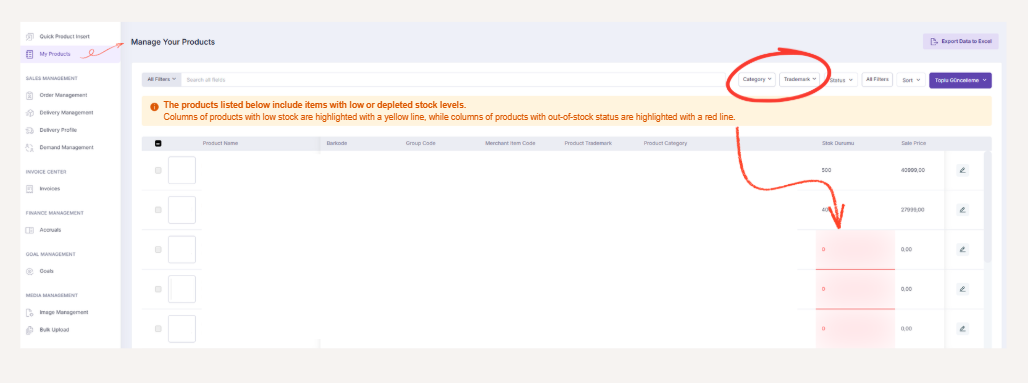
The Products page is the main management area where you can view all your active and inactive products that you have uploaded to the system as a seller. This page is used to prepare products for sale, review existing product data, and identify any missing or incomplete fields that may need to be updated.
On this screen, products are listed together with the following information:
* **Mini Product Image:** A small preview image used to quickly identify the product.
* **Product Name:** The name of the product displayed to customers on the platform and used to distinguish the product.
* **Barcode:** A unique identifier of the product used for product matching, stock tracking, and integration processes.
* **Group Code:** A code that links variants of the same product (e.g., color, size) to each other.
* **Seller Item Code:** A reference code used by the seller to identify the product within internal systems.
* **Brand:** Indicates the brand to which the product belongs and is used in filtering and reporting processes.
* **Category:** Represents the product’s position within the platform’s category hierarchy.
* **Stock Status:** Displays the current stock level of the product and its availability for sale.
* **Sale Price:** The effective selling price displayed to customers after discounts or campaigns.
* **Commission Rate:** The percentage of commission charged by the platform on the product sale.
* **Status:** Indicates whether the product is active or inactive and whether it is available for sale.
This listing enables sellers to quickly analyze the overall status of their products from a single screen.
* [x] Products with completed data can be set to active or inactive from this page.\
Setting a product to inactive is used to prevent the product from being visible to customers when it is out of stock, temporarily unavailable for sale, or requires updates. Products set to active become available for sale
* [x] As with the Price / Stock Management page, products with critical stock levels are visually highlighted on this page:
* **Low-stock products** are displayed with a **yellow line** in the table.
* **Out-of-stock products** are displayed with a **red line**.
These visual indicators help sellers quickly identify stock levels and take timely action.
* [x] Sellers can filter listed products by **category and brand** to access products more quickly. This feature provides significant management convenience, especially for sellers with large product portfolios.
* [x] All products listed on the Products page can be exported in Excel document format using the Export Data button. This feature can be used for reporting, validation, and archiving purposes.
### **Product Detail Page**
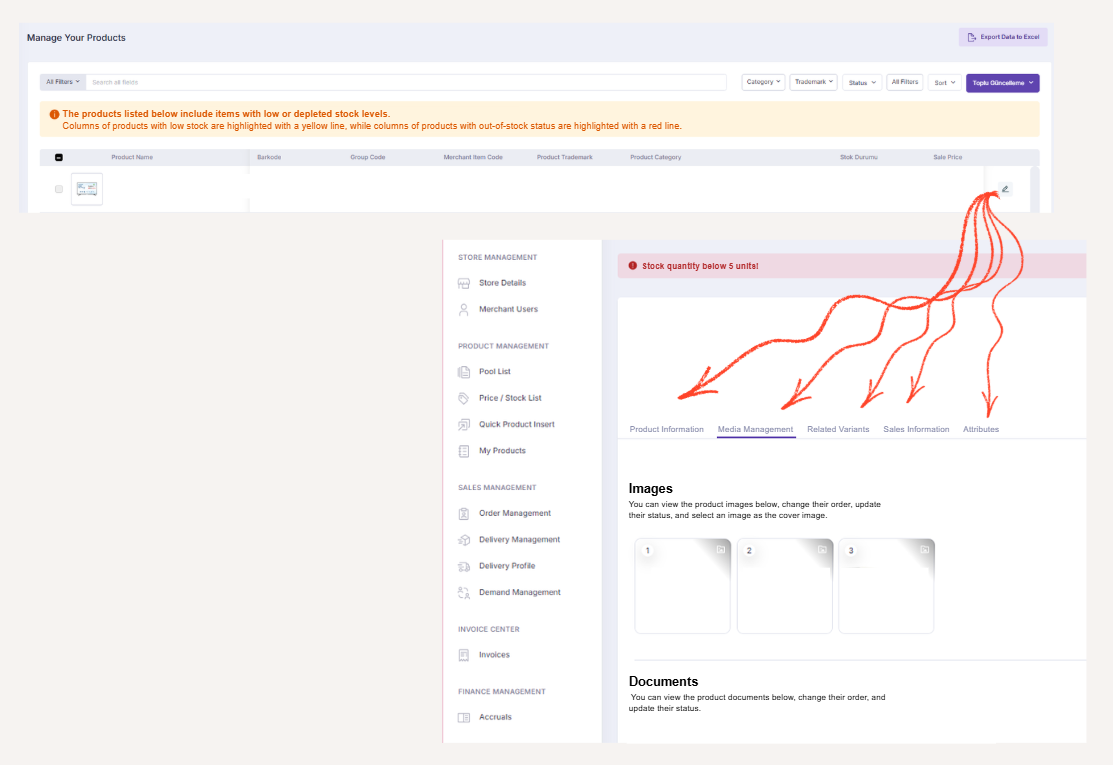
When navigating to the details of any listed product, the following tabs are displayed: Product Information, Media Management, Related Variants, Sales Information, Attributes.
* #### **Product Information**
The Product Information tab contains the basic descriptive details of the product. Core product information is displayed in this section.
* #### **Media Management**
The Media Management tab is where uploaded images and documents related to the product are managed. In this section, you can:
* View uploaded media files
* Change the order of images
* Update media statuses
* Select a cover image
Image uploads are not performed on this page. New media uploads are handled through the Pool List page.
{% hint style="info" %}
For detailed information about image uploads, please refer to the [**Pool List**](/components/lidia-merchant-console/merchant-console-user-guide/product-management/pool-list.md) page.
{% endhint %}
* #### **Related Variants**
The Related Variants tab displays product variants that are linked to each other using a group code. The following information is listed for each variant:\
-Variant Name
\
-Variant Code
\
-Integration Code
\
-Attribute Count
\
-Media Count
\
-Status
This structure allows variant-based products to be managed as a single unified product group.
* #### **Sales Information**
The Sales Information tab displays key sales-related details of the product:
* Sale price
* Stock information
* Commission rate
In addition, when the stock quantity falls below 5, the following alert is displayed on the screen:\
**“Stock quantity below level 5!”**\
This alert helps ensure more effective stock monitoring.